Create a MAC-Specific Provisioning Template and Role
User's Guide feedback on: Cisco Server Provisioner 6.6 User's Guide ("Chuck Berry") - Create a MAC-Specific Provisioning Template and RoleProvision_Red_Hat_MAC-SpecTutorial: Provision Red Hat, CentOS, KVM and Fedora > Create a MAC-Specific Provisioning Template and Role /Dear User's Guide Staff,
Create a MAC-Specific Provisioning Template and Role
First, you must create a MAC-Specific Provisioning Role Template (specifying what OS/distro to install, and optionally, what applications to install and scripts to execute) then create a MAC-Specific Provisioning Role for a specific system with its unique MAC address, and assign the Provisioning Template to the Provisioning Role (unique per server, blade or VM).
Please read this entire Topic to fully understand the concepts and mechanisms.
If you create multiple Templates, you can easily change what OS/distro to install on the system (and optionally what applications to install and what scripts to execute) by simply assigning a different Template to the Provisioning Role.
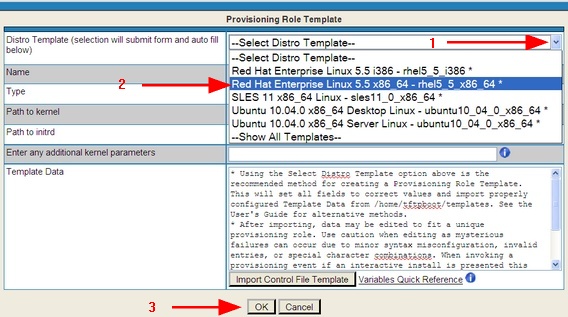
Select what you want to provision with this Template:
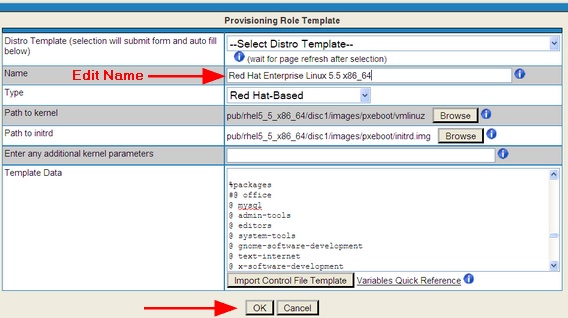
After you have made your selection, the form’s fields will be automatically populated:
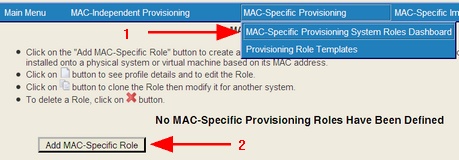
You will then be brought back to the Templates page:
Note: if you loaded a newer release of RHEL/CentOS (5.11, or 6.7 or greater), select the directory you used to load the media and rename the template to reflect its correct ISO content (e..g, if you loaded CentOS 6.7 into CentOS 6.3, select CentOS 6.3 and rename the template to "CentOS 6.7" or to "CentOS 6.7 loaded into 6.3".
Create the Provisioning Role (or edit an existing one)
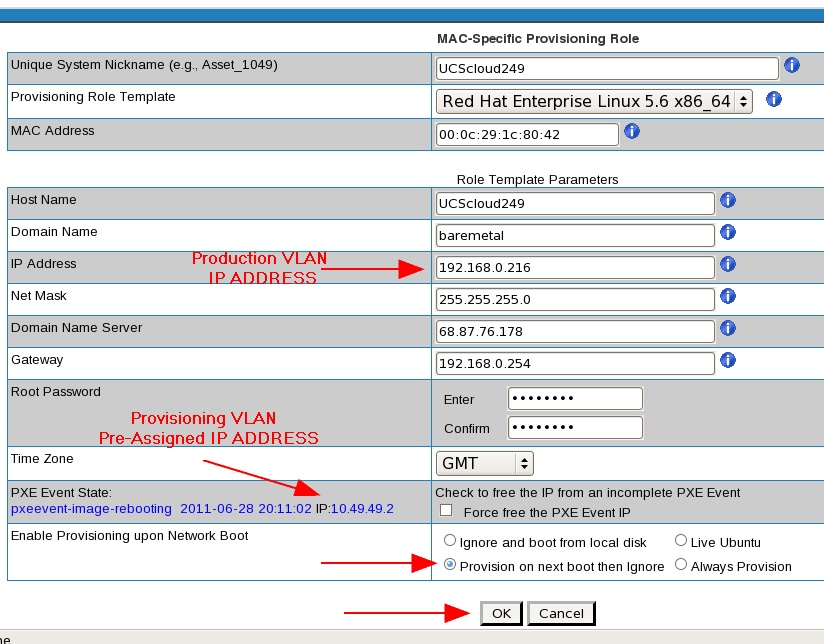
In dual-VLAN configurations, the client will boot on the Provisioning VLAN with a dynamic IP address provided by the Provisioner PXE Server (the same PXE Event IP address used during the provisioning process), and will keep its dynamic PXE VLAN IP address until it is relocated to another (V)LAN, no matter how many times it gets rebooted on the PXE VLAN.
Once the system is relocated to another (V)LAN and gets rebooted, post-OS-installation boot scripts will change the IP address of the Client from its dynamic IP (DHCP) address of the PXE VLAN to the static IP address you specified for use on the Production VLAN in the GUI or via the API.
Caution: if you accidentally move your system to a VLAN other than the VLAN of the IP address specified in the GUI or provided via the API (the "Production VLAN"), your system will become unreachable by IP address.
With RHEL and CentOS, you can select the IP address to be static or DHCP after the system has been rebooted on the non-PXE VLAN.
Static IP:
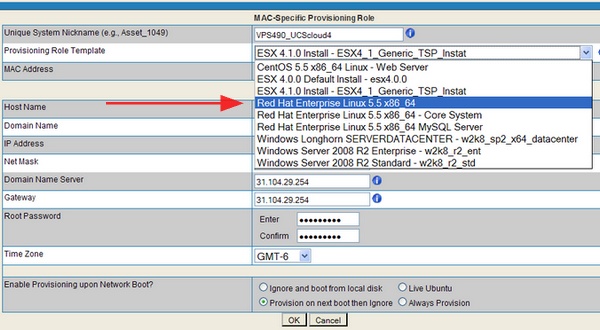
Complete the form and select the "Next Boot" option in this dual VLAN example:
MAC addresses must be entered in colon-delimited format, e.g., 00:50:56:49:49:49.
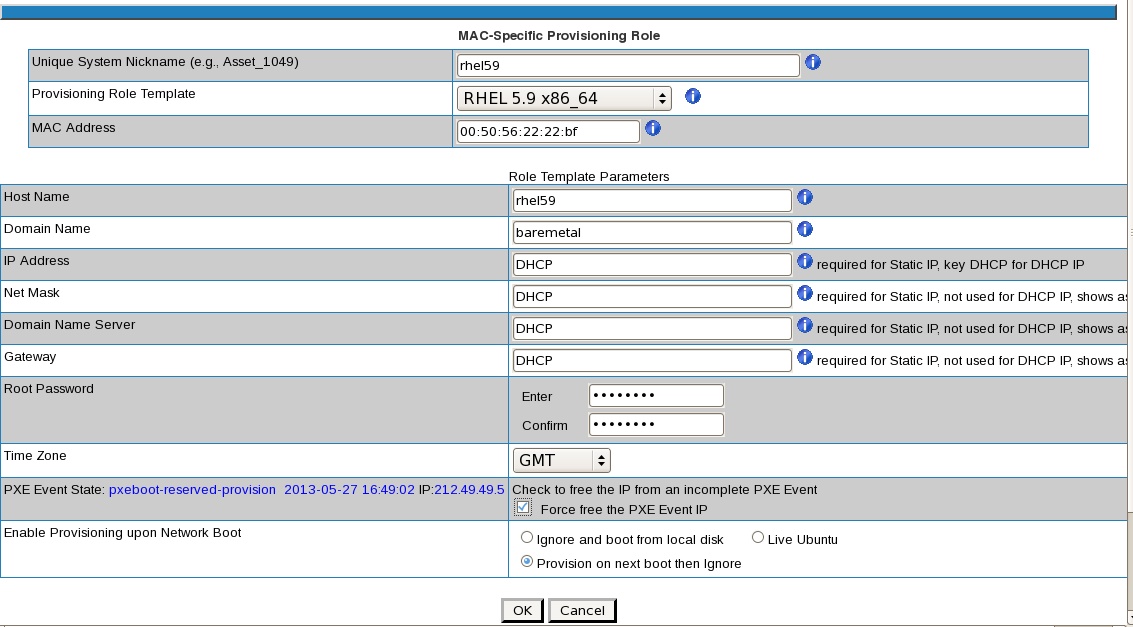
DHCP IP: instead of entering static IP-related information, enter only "DHCP" as noted below.
When provisioning with DHCP IP, the final 2 PXE Event States will be pxeevent-macindy-rebooting and pxeevent-macindy-rebooted.
Note: the Domain Name field is ignored. No domain will be set on the provisioned client.
And you will be brought to the Roles Dashboard, showing the "PXE Event State" and Provisioning PXE VLAN IP, as well as the eventual production VLAN IP address.
In dual-VLAN configurations, the client will boot on the Provisioning VLAN with a dynamic IP address provided by the Provisioner PXE Server (the same PXE Event IP address used during the provisioning process), and will keep its dynamic PXE VLAN IP address until it is relocated to another (V)LAN, no matter how many times it gets rebooted on the PXE VLAN.
Once the system is relocated to another (V)LAN and gets rebooted, post-OS-installation boot scripts will change the IP address of the Client from its dynamic IP (DHCP) address of the PXE VLAN to the static IP address you specified for use on the Production VLAN in the GUI or via the API.
Caution: if you accidentally move your system to a VLAN other than the VLAN of the IP address specified in the GUI or provided via the API (the "Production VLAN"), your system will become unreachable by IP address.
TIP: if your Client fails to change to its static IP when rebootingon a properly configured production (V)LAN, review the reboot log on the Client system in:
/root/bmpReboot.log
NOTE: Single VLAN configurations will be provisioned using an IP from the automatically-assigned PXE Event IP range, then switch to the user-selected static IP address outside of the PXE Event IP range. Remember you need a non-Provisioner DHCP server running on this VLAN.
Finally, boot the Client System to the network, and it will be provisioned with the operating system you selected. It will then reboot and be fully operational. Once the system is relocated to the production VLAN and gets rebooted, post-OS-installation boot scripts will change the IP address of the Client to the IP address selected for use on the Production VLAN.