User's Guide feedback on: Cisco Server Provisioner 6.6 User's Guide ("Chuck Berry") - Client with multiple NICsClient_Systems_MAC_Address_Multiple_NICsClient Systems > Determine the Client’s MAC Address > Client with multiple NICs /Dear User's Guide Staff,
Client with multiple NICs
Starting with Provisioner 6.4, the MAC-Specific provisioning of RHEL/CentOS, Windows Server 2008 and ESX/ESXi Clients with up to 4 NICs is supported. Imaging of Clients with up to 4 NICs is also supported.
This allows the user to select any of the first 4 NICs to be used for provisioning or imaging. The MAC addresses of the NICs not used for provisioning or imaging on the PXE VLAN will be ignored by the Provisioner PXE Server.
To identify the MAC addresses of your non-UCS multi-NIC system:
•Either unplug all network cables between the Client and the network, or disable the Provisioner PXE Server on your PXE VLAN, then
•PXE-boot the Client
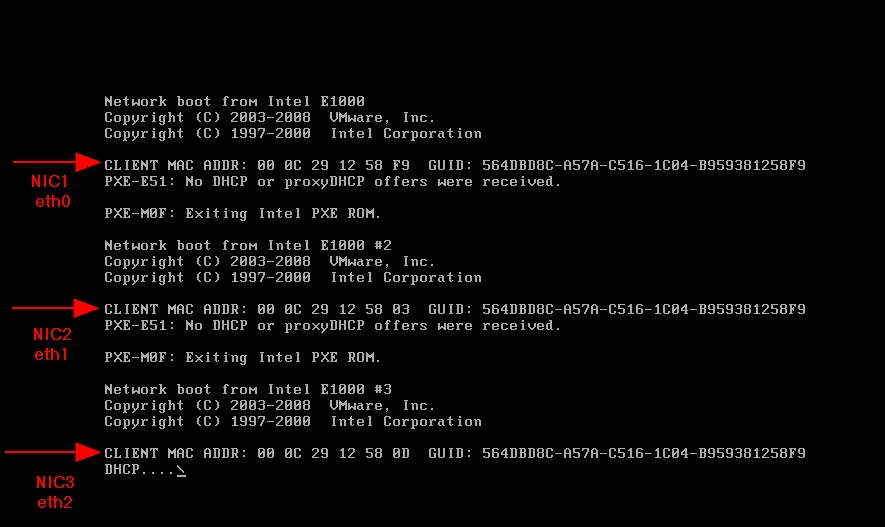
•Watch as the MAC addresses are discovered in sequence, starting with NIC1 (eth0)
•Record the MAC addresses manually or via screen shot, as illustrated below: