|
|
||
When using the command line, you must have full root access
The Provisioner PXE Server requires full root access privileges. You must either login as root, or subsequently execute the command: # su - root Note the dash (-) before "root". If you do not use the dash, you will not have full root access privileges (instead, you will have the lesser root access privileges as if you entered "sudo root".)
|
Login To The Provisioner PXE Server's GUI
Start your Firefox browser. Firefox is the only supported browser. Unsupported browsers may cause incomplete backend processes and synchronization issues including incorrect/incomplete forms submissions, session management issues, inappropriate caching and many other anomalous behaviors. Access the Provisioner PXE Server Graphical User Interface (GUI) by typing the following URL in your browser: http://<your_Provisioner PXE Server_ip_address>/tftpboot/ for example:
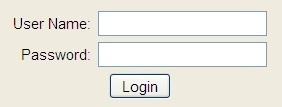
http://192.168.0.201/tftpboot The Provisioner PXE Server presents the Login page:
The default User Name is "admin" and the default password is "admin". Learn how to change the password and add/edit/delete users.
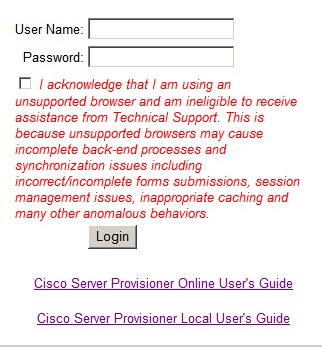
Should you attempt to login with a non-Firefox browser, the login page will appear as:
If you use an unsupported browser, you are ineligible to receive assistance from Technical Support. Unsupported browsers may cause incomplete backend processes and synchronization issues including incorrect/incomplete forms submissions, session management issues, inappropriate caching and many other anomalous behaviors.
|
Adding, editing and deleting GUI users and changing passwords can only be done from the command line when logged in as root. Below is an example of adding a user.
cd /home/tftpboot/bin
sh lbmp-DB_user_management.sh
Provisioner PXE Server Manage GUI Access Users (c)2010 Cisco Corp.
Existing Users: List of roles Role name | Superuser | Create role | Create DB | Connections | Member of -----------+-----------+-------------+-----------+-------------+----------- admin | no | no | yes | no limit |
Select User Action: Add new user, Change user password, Delete user ----> type response and press enter, "q" will quit the process add, change, delete, quit; a/c/d/q: a
----> type response and press enter, "q" will quit the process Enter a User name: jsmith
Avoid special characters, 4 characters required, more than 8 letters and numbers work best Enter password for jsmith: **********
CREATE ROLE Existing Users: List of roles Role name | Superuser | Create role | Create DB | Connections | Member of -----------+-----------+-------------+-----------+-------------+----------- admin | no | no | yes | no limit | jsmith | no | no | yes | no limit |
Select User Action: Add new user, Change user password, Delete user ----> type response and press enter, "q" will quit the process add, change, delete, quit; a/c/d/q: q
|