

PXE Event IP Addresses |

|

|

|

|
||
PXE Event IP Addresses |
|
|
|

|

|
PXE Event IP Addresses |
|
|
|
|
||
PXE Event IP Addresses |
|
|
|
|
|
|
|
||
"Provisioner-dedicated PXE IP" addresses are used for provisioning and imaging. These IP addresses are automatically managed by the Provisioner PXE Server.
In the "2 NICs and 2 VLANs" configuration (recommended for orchestration), the PXE IP addresses are associated with the dedicated Provisioning VLAN. After having been provisioned or imaged, the client will reboot to the Provisioning VLAN. Once the Client is relocated from the Provisioning VLAN to a Production VLAN, upon rebooting on the Production VLAN, the Client will be set with the static IP address selected in the GUI or via the API using post-OS installation scripting (for RHEL/CentOS and Windows Server 2008/R2 initially). Then, the PXE Event IP address must be "freed" and this PXE Event IP can be made available to provision or image another system on the Provisioning VLAN.
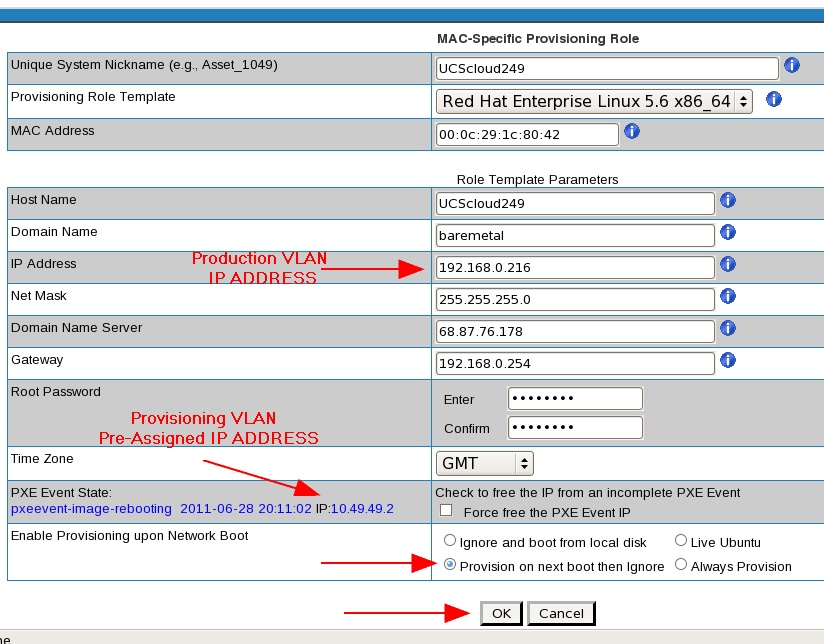
Freeing PXE Event IP Addresses
At times, you may need to "free" or "release" PXE Event IP addresses. For example after you have relocated a system from the Provisioning VLAN to a Production VLAN, you must free the PXE Event IP address so it may be used with another system. If you free a PXE Event IP without understanding the PXE Event State a system is in, you may lose connectivity with the system and you will need to access it physically.
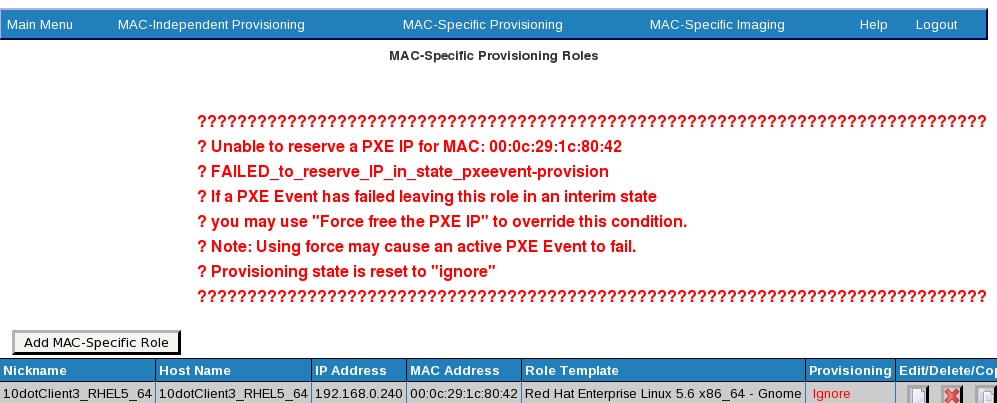
Below is an illustration of a GUI error message should you set a Client to be provisioned to "Next Boot" and its PXE IP address is not available:
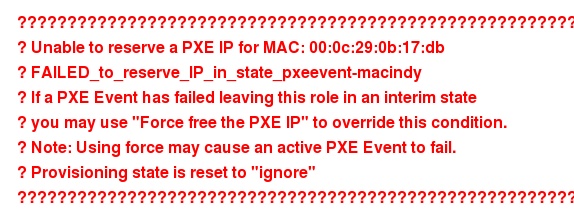
Below is an example of a conflict because the MAC address of the client was previously used for MAC-Independent provisioning and is now attempted to be used for MAC-Specific provisioning:
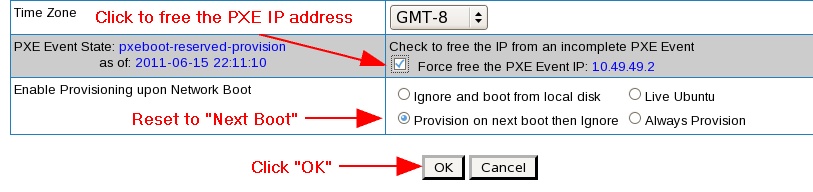
Below is an illustration of how to force the freeing of an IP address in a MAC-Specific Role, assuming you the Client system has been relocated to another network.
In the "1 NIC and 1 VLAN" configuration, PXE Event IPs are managed from a "range" of addresses (the defaults are .151 to .200), and these IPs are used only during provisioning and imaging. When the provisioned system reboots, it will be assigned a different IP address (outside of the PXE Event IP range) as designated through the GUI or the API.
Using Force Free with the GUI or API: under certain circumstances, the PXE Event State of the Client is "unknown". The user (via GUI or API) must acknowledge that the "Force Free the IP" action is appropriate and will not orphan or disable a Client with a new PXE action.
•API: the Force Free option can be included when the orchestrator work flow has a single unconditional path and the action is desired regardless of last known Client status
•API: when multiple work flow actions are desired, then the return status "FAILED_free_in_state_..." should be trapped and the desired path taken. One of the paths can be re-submit with Force Free.
•GUI and API: under normal circumstance the Delete action will free any associated PXE IP. If the "FAILED_free_in_state_..." is returned it requires the Force Free.
Learn more about PXE Event States
Troubleshooting Scripts and Logs
As you use the GUI or API to activate Roles and Profiles, and as you provision or image systems, you can execute scripts to capture information and review logs pertaining to the PXE IP addresses in the bootp range.
PXE IP mapping script: this produces a comprehensive view of all PXE IP management components:
/usr/local/linmin/pxeMacIpInfo.sh
PXE IP mapping script: this produces the same comprehensive view of all PXE IP management components using the script above, however, it also outputs to a log file:
/home/tftpboot/bin/pxeMacIpInfoCapture.sh
PXE IP log file location:
/usr/local/linmin/pxeMacIpInfoCapture.log
GUI and backend PXE IP management cumulative log:
/usr/local/linmin/dhcpPXEmanagement.log
PXE Event Log:
/usr/local/linmin/linmin-bmp-pxe-event.log
PXE Post and onboot log:
/usr/local/linmin/pxeEventState.log
Tip: before each session, set markers such as:
# echo "-----------------------------------------" >> dhcpPXEmanagement.log
# date >> dhcpPXEmanagement.log
# echo "-----------------------------------------" >> dhcpPXEmanagement.log
# echo "-----------------------------------------" >> pxeEventState.log
# date >> pxeEventState.log
# echo "-----------------------------------------" >> pxeEventState.log
Then run a command window with:
/usr/local/linmin/pxeEventState.log
# tail -f /usr/local/linmin/dhcpPXEmanagement.log /usr/local/linmin/pxeEventState.log
Become familiar with the expected sequence of each type of PXE Event action. Pay particular attention to reported anomalies such as missing or invalid MACs and "????" errors and failures. Note that "FAILED_{messages}" are often valid and expected.
The alternative to using tail is to less, more, cat, or edit and review the logs.
DHCP: dhcpd.conf (to verify the status of every IP on the Provisioning VLAN and see what MAC addresses are associated with what IP address):
/etc/dhcpd.conf
For example, to verify the status if the IP .4 on the Provisioning VLAN 212.49.49.0:
host ip004 { hardware ethernet 00:0c:29:1c:80:42; fixed-address 212.49.49.4; next-server 212.49.49.1; } #~# pxeevent-image-rebooting 00:0c:29:1c:80:42 20110801211802188970000
Additional resources can be found in Client system can't find the Provisioner PXE Server.
Capturing PXE boot and DHCP transactions
Use the following script to capture all PXE boot and DHCP traffic and save it to a file:
/usr/local/linmin/pxeDhcpTcpdump.sh
The script is self-documented. You will be presented with several options to start a capture, end a capture, view the results, save the results to a file, etc.
Each restart provides the option to continue to append to the existing human-readable file, otherwise it sets aside the prior file with a date and time stamp and starts a new file.
Current file:
/usr/local/linmin/pxeDhcpTcpdump_ports_67-69.pcap
Archived file:
/usr/local/linmin/pxeDhcpTcpdump_ports_67-69_20110209_031051.pcap
Additional resources can be found in Client system can't find the Provisioner PXE Server.
