|
|
||
If your Provisioner PXE Server is hosted on an VMware hypervisor, ensure that NAT and DHCP are disabled on the hypervisor.
Maximize the command line window before taking screen shots. If a single screen shot doesn't capture all the information needed, scroll up to the top of the window, then take screen shots as you page down so all the information is captured.
Note: if running in a VMware Virtual Machine, due to host hypervisor caching issues, it is not recommended that you use MAC-Independent provisioning then MAC-Specific provisioning for the same Client (same MAC address). If you are setting up an environment to become familiar with the Provisioner PXE Server:
1) Take a snapshot of the system immediately after installation
2) Become familiar with MAC-Independent (rarely used in production, but provides a quick way to verify network connectivity and to become familiar with basic provisioning operations)
3) When ready to start the Proof of Concept or start production use, revert to the prior snapshot
4) Start using MAC-Specific Provisioning
Note: Windows Server 2008 R2 contains additional drivers not found in Windows Server 2008 (non-R2). If you provisioning of non-R2 fails, then try provisioning Windows Server 2008 R2.
Client System Can't Find the Provisioner PXE Server
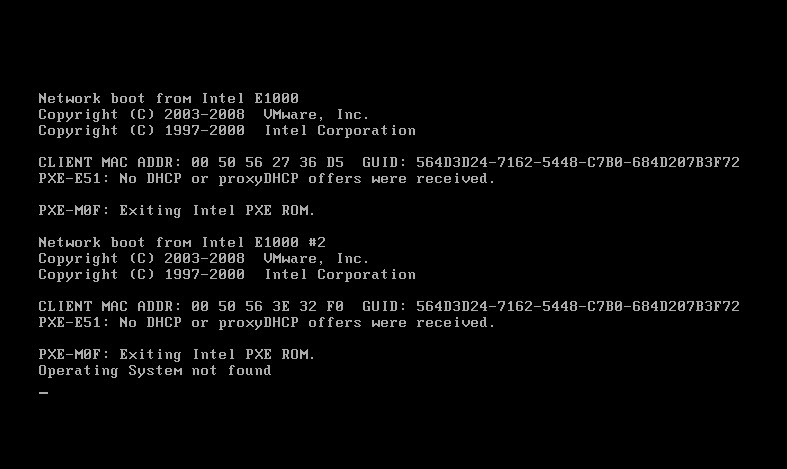
The single most common error while provisioning or imaging is that the Client system cannot communicate with the Provisioner PXE Server, most often due to network configuration issues, as the Client's PXE request doesn't reach the Provisioner PXE Server.
If a Client PXE request doesn't reach the Provisioner PXE Server, you can execute purpose-built scripts (e.g., pxeMacIpInfo.sh) to capture information and review logs pertaining to the PXE IP addresses in the bootp range.
Other topics to consider are as follows: •Are needed firewall ports on the Provisioner PXE Server closed (these are different ports than those needed to install the Provisioner PXE Server)? •Confirm your Provisioner PXE Server is receiving the Client's PXE request: capture activity on ports 67 & 69. •Review the contents /var/log/messages file. For example, to tail the log's last 12 lines: # tail -n12 /var/log/messages May 17 14:05:40 baremetal dhcpd: Wrote 7 leases to leases file. May 17 14:05:40 baremetal dhcpd: Listening on LPF/eth0/00:50:56:00:00:bb/192.168.0/24 May 17 14:05:40 baremetal dhcpd: Sending on LPF/eth0/00:50:56:00:00:bb/192.168.0/24 May 17 14:05:40 baremetal dhcpd: Sending on Socket/fallback/fallback-net May 17 14:05:47 baremetal dhcpd: DHCPDISCOVER from 00:0c:29:82:bb:62 via eth0 May 17 14:05:47 baremetal dhcpd: DHCPOFFER on 192.168.0.161 to 00:0c:29:82:bb:62 via eth0 May 17 14:05:47 baremetal dhcpd: Dynamic and static leases present for 192.168.0.161. May 17 14:05:47 baremetal dhcpd: Remove host declaration 00-0c-29-82-bb-62 or remove 192.168.0.161 May 17 14:05:47 baremetal dhcpd: from the dynamic address pool for 192.168.0/24 May 17 14:05:47 baremetal dhcpd: DHCPREQUEST for 192.168.0.161 (192.168.0.233) from 00:0c:29:82:bb:62 via eth0 May 17 14:05:47 baremetal dhcpd: DHCPACK on 192.168.0.161 to 00:0c:29:82:bb:62 via eth0 May 31 09:20:19 baremetal kernel: VMCIUtil: Updating context id from 0x9816be49 to 0x9816be49 on event 0.
In the example above, you can clearly see that the Client system (MAC address 00:0c:29:82:bb:62) reached the Provisioner PXE Server and that the Provisioner PXE Server started servicing the Client system.
At any time, you can get the messages log entries for a Client based on its MAC address. For example, using the MAC address above: Search for the MAC in the current log file: # grep '00:0c:29:82:bb:62' /var/log/messages May 17 14:03:01 baremetal dhcpd: DHCPDISCOVER from 00:0c:29:82:bb:62 via eth0 May 17 14:03:03 baremetal dhcpd: DHCPREQUEST for 192.168.0.155 (192.168.0.233) from 00:0c:29:82:bb:62 via eth0: May 17 14:03:03 baremetal dhcpd: DHCPNAK on 192.168.0.155 to 00:0c:29:82:bb:62 via eth0 May 17 14:05:22 baremetal dhcpd: DHCPDISCOVER from 00:0c:29:82:bb:62 via eth0 May 17 14:05:22 baremetal dhcpd: DHCPOFFER on 192.168.0.161 to 00:0c:29:82:bb:62 via eth0
Search for the MAC in all logs (note the asterisk): # grep '00:0c:29:82:bb:62' /var/log/messages* # grep '00:0c:29:82:bb:62' /var/log/messages | grep 'DHCP'
If you do not see the MAC address of the Client to be provisioned or imaged in this log file, you must resolve the networking configuration. Customer Support cannot help you with your network configuration/topology.
Note: if the log displays a message about Leases (e.g., "no free DHCP leases available" or "no free leases available"), you can ignore it. This is expected behavior as Provisioner 6.3 and above do not use DHCP leases.
The following is a client-side screenshot where the client system cannot reach the Provisioner PXE Server:
|
Provisioning Does Not Begin on Client System
Premise: The client's Role on the Provisioner PXE Server has an incorrect MAC address. Solution: Edit the client's provision profile, and ensure that the MAC address is correct.
Premise: The client cannot find the live, authoritative (non-Provisioner PXE Server) DHCP server running on the subnet. Solution: Make sure that your live (non-Provisioner PXE Server) DHCP is installed, properly configured and running. Read more about co-existing with your live (non-Provisioner PXE Server) DHCP server. Make sure that the Provisioner PXE Server's firewall ports are opened as required. Make sure that you don’t have another active Provisioner PXE Server on the same subnet. Confirm your Provisioner PXE Server is receiving the Client's PXE request: capture activity on ports 67 & 69. |
Provisioning does not complete on the Client system: is your ISO bootable?
Should the provisioning event begin but fails to complete (e.g., it freezes), make sure that your ISO is bootable on the Client system, and that it can complete the OS installation successfully independent Provisioner: •Burn the ISO file to DVD, or if your system allows (e.g., with a virtual machine) simply use an ISO file •Boot the Client system from DVD or from ISO file •If the Client fails to have its OS installed to completion, you have a non-bootable or non-fully installable ISO and Cisco cannot assist you. Locate a bootable, fully-installable ISO, boot your Client from this ISO, and once verified that the Client boots from this ISO and successfully installs the OS, use the Provisioner media management scripts then use the GUI to create MAC-Specific Templates or MAC-Independent Provisioning Roles. •Note that lack of driver support in the OS ISO is often the cause for the OS installation to fail before completion. |
MAC-Independent Provisioning works for some, but not all, Distros and OSs
Premise: You have not assigned the correct boot/install option for the the Role that fails to provision. Solution: Assign the correct boot/install option for each OS as follows: •For Red Hat, Asianux, CentOS and Fedora Core distributions, use the Kickstart option. •For SUSE-based distributions, use the YaST option. •For Ubuntu and Debian distributions, use the Debian option. •For Windows OSs and VMware ESX, use the Windows/Other option. •Use the automatically-populated Roles when using MAC-Independent Provisioning |
After provisioning a Linux client, the client GUI doesn't start
Solution: Log in to the client's terminal, and as root user, type the following command: startx
Note: certain Linux distros provisioned by the Provisioner PXE Server do not include X-Windows and a desktop by design (e.g., Debian, Ubuntu Server, Fedora 13) |
Premise: A step in the Debian setup was missed. Solution: Read on Access the Debian Distribution Media. Creating the symbolic link with the following two commands is particularly important. cd /home/tftpboot/pub/debian/dists ln -s etch stable
Premise: The Client does not have Internet access to reach a repository Solution: Provision a non-Debian/non-Ubuntu to the Client, or deploy Debian Rescue, and ensure that the Client has Internet access. |
When provisioning Debian or Ubuntu, a popup box states "Bad Archive Mirror"
Premise: The client did not have access to a public (Internet) or local repository. Solution: Ensure your client has Internet access or access to a local repository |
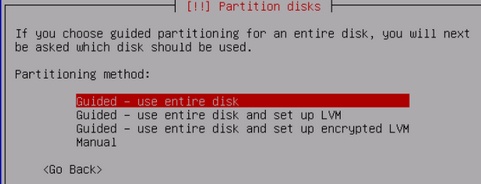
When Provisioning Debian or Ubuntu a Pop-Up Box Asks How to Partition Disks
The following error message may appear:
This may indicated that you are provisioning an IDE ("hda") drive using a preseed.cfg that has SATA ("sda") drive as the default. Change the "part-man" command from "sda" to hda" (or vice-versa).
|
The client UI displays “PXE-M0F: Exiting Intel Boot Agent” then hangs, does not boot from HD
Premise: there was a PXE timing error (this network anomaly happens occasionally) Solution: reboot the client system and boot to the network (more than once if necessary) Note: certain NIC cards retain the IP address of the previous system they did a PXE boot to. In this case, one must boot to the network 2 to 3 times to clear the prior IP address.
Premise: Cable connected to the incorrect network adapter Solution: Try plugging your CAT cable into another network port on the Client
Premise: The BIOS cannot find the HD that it is supposed to boot from Solution 1: Obtain a BIOS FLASH update from the manufacturer Solution 2: When using “Always boot from the network first” because you are letting the Provisioner PXE Server business rules decide whether a system is to be provisioned, imaged or booted from local HD, ensure the boot sequence is network, ATAPI, floppy, hard drive Solution 3: If have configured your system to boot from the network last, the boot sequence should be ATAPI, floppy, hard drive, network
Premise: Bad network cable Solution 1: Replace the network cable and retry |
The Red Hat-based (Red Hat, Fedora, CentOS, Asianux) client system being provisioned interrupts the provisioning process and displays a message similar to: unable to retrieve http://10.7.1.23//tftpboot/pub/rhel5_3_x86_64/image/stage2.img
For Ubuntu-based distributions, a similar type of message can occur: Failed to retrieve the pre-configuration file http://10.0.15.21/tftpboot/controlfiles/001a4d681b55.cfg The installation will proceed in non-automated mode.
These errors can be caused by many situations that can be very difficult to isolate. A useful free tool used to analyze the network during provisioning is available from http://www.wireshark.org/ (We recommend this tool and may offer support in selected situations on an hourly consulting fee basis.)
Common causes and remedies experienced by Cisco and its customers include: •This stage2 failure is often caused when the provisioning target has multiple NICs or the Linux distro has a kernel that is not in sync with PXE protocols. oForce the kickstart installation to take place over a specified Ethernet device oAdd the line network --device=eth# in the *ks.cfg in pub/ (for MAC-Independent Provisioning) or to the MAC-Specific Role Template text box containing the control file (for MAC-Specific Provisioning). You may append –device=eth# to any existing line starting with “network” after other parameters you may find. The eth# is normally eth0 but can be eth1, eth2, etc. oThe ksdevice option at the install boot prompt can be used by adding the ksdevice=eth# parameter. This is accomplished by entering "ksdevice=eth#" in the GUI "Enter any additional kernel parameters" field of Provisioning Role Templates (for MAC-Specific Provisioning) or of Provisioning Roles (for MAC-Independent Provisioning). The eth# is normally eth0 but can be eth1, eth2, etc. ▪An other kernel parameter that addresses the issue under certain circumstances is “ksdevice=link”
•Network connectivity problems (race conditions or other situations requiring resetting devices). Also, the anaconda installer has a known bug whereby it does not retry to locate the installation media directory and will simply time out, giving the “unable to retrieve” message. oDisconnect and reconnect client systems network cable to switch/router; power down and up switch/router. Optionally, disconnecting cables from the Provisioner PXE Server to its switch/router and cables between all connected network devices up to the client system, powering down all devices including shutting down the Provisioner PXE Server, then reconnecting all cables, powering on all network devices, then the Provisioner PXE Server, then the client system (this is a rare instance, but it happens occasionally) oSlow link response on switches - set each interface "spanning-tree portfast" oCertain newer install processes involve larger files and contacting the Provisioner PXE Server DHCP service multiple times before and after downloading files. The short lease time intended to support temporary use of IPs causes different IPs to be sent and creates certain failures. If this is your issue, the resolution is to increase the default lease time: oChange the IP address of the Provisioner PXE Server from a fixed IP address to an externally resolvable DNS address: •From: url --url http://$server_ip_address/$tftpboot_webpath/pub/centos5_4_x86_64 •To: url --url http://linmin.yourcompany.com/$tftpboot_webpath/pub/centos5_4_x86_64 ▪For MAC-Specific provisioning, make the change in the Provisioning Role Templates and re-generate the Provisioning Roles. ▪For MAC-Independent provisioning, edit the control file in pub/{distro}/ and remember that if you run setup.pl to change other networking configurations, you will need to change the IP address again.
•Corrupted ISO media or extracted files oRe-download the ISO file (or clean the CD/DVD and re-run loaddvd.pl) and run loadwindows.pl or loadlinux.pl
|
If you still require assistance, please follow the instructions in "Contacting Technical Support".