|
|
||
Restarting the Provisioner services is known to solve several categories of issues due to timing and other conditions:
cd /usr/local/linmin
./linmin-services.sh restart
"Unable to connect" message from the Firefox browser
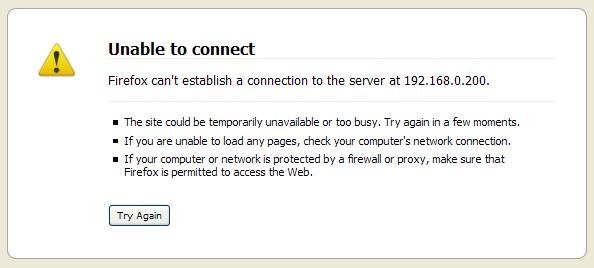
You see Firefox display a message similar to the following:
This means that either the IP address you are using to access the Provisioner PXE Server is incorrect, or that the Provisioner PXE Server services are not running.
To start all services required to run the Provisioner PXE Server (including at system boot time): /usr/local/linmin/linmin-services.sh start Note that the script can also be executed by: cd /usr/local/linmin ./linmin-services.sh start
|
The Provisioner PXE Server does not respond or will not start
Premise: The Provisioner PXE Server's disk has inadequate space to copy the distro/OS CD/DVDs. Solution: Check the Provisioner PXE Server's disk utilization (df -h), and ensure that adequate space exists for the distro/OS files.
Premise: The Provisioner PXE Server was not properly started. Solution: Manually re-start all services: /usr/local/linmin/linmin-services.sh restart
Learn more about linmin-services.sh and error logs
|
When you log in to the Provisioner PXE Server GUI, the browser screen is blank
Premise: You have another service running that also uses Port 80 and conflicts with the Provisioner PXE Server. Solution: Stop services (such as Apache) that use Port 80
Premise: Your Provisioner PXE Server's SELinux is set to “enforcing”. Solution: Change Security Enabled (SE) Linux by performing the following steps: Open the /etc/sysconfig/selinux file (the file that sets the SE Linux status) in a text editor, and look for one of the following lines: SELINUX=permissive or SELINUX=enforcing or SELINUX=disabled If SELinux was set to “enforcing”, change this line to the following: SELINUX=permissive Close and save the /etc/sysconfig/selinux file, and reboot the system. Note: “permissive” only logs what SELinux might do and does not cause any software/subsystem to not function. It is one way to learn what a subsystem is trying to do and how to enforce stronger security. |
Review How License Keys Work and the contents of the PXE Event Log for license key-related messages. |
The Provisioner PXE Server will start every time the system on which it runs is powered on. At any time, you can stop, start, restart or check the status of the Provisioner PXE Server by following the instructions below: Execute as root user: To start all services required to run the Provisioner PXE Server (including at system boot time): /usr/local/linmin/linmin-services.sh start Note that the script can also be executed by: cd /usr/local/linmin ./linmin-services.sh start To stop all services required to run the Provisioner PXE Server: /usr/local/linmin/linmin-services.sh stop To restart (shut down then start) all services required to run the Provisioner PXE Server: /usr/local/linmin/linmin-services.sh restart To check the status of all services required to run the Provisioner PXE Server: /usr/local/linmin/linmin-services.sh status The script may be invoked at any time a status check is desired. If all services are running, the following message will appear: LinMin Bare Metal server status is OK Error results will be displayed on the console and logged to /usr/local/linmin/status/ current_status_check and to a status_ERRORs. {scriptTimeStamp}.
The script linmin-services.sh generates or updates log and error files in /usr/local/linmin/status/: •current_status_check (contains results of the most recent execution of the script linmin-services.sh) •prior_status_check (contains results of the second- most recent execution of the script linmin-services.sh) •status_ERRORs.{scriptTimeStamp} [...] (file generated each time there is an error condition) To review the latest results: cat /usr/local/linmin/status/current_status_check cd /usr/local/linmin/status/ |
"Client IP Address is Invalid" or "Node IP Address is Invalid"
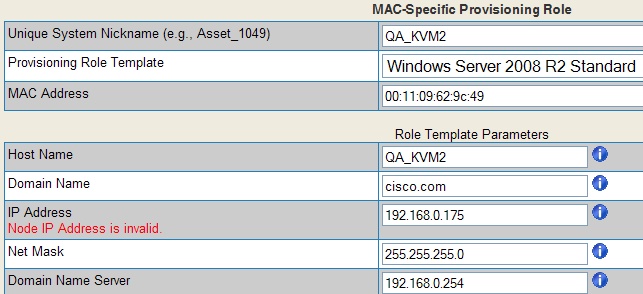
If you see the message below in the MAC-Specific Provisioning Role edit page, it is because you have assigned an IP address to the Client system that is in the bootp range of temporary DHCP addresses assigned by the Provisioner PXE Server during provisioning or imaging.
To address this issue, change the IP address to one that is outside the bootp range.
You can also change the bootp range by running setup.pl: cd /home/tftpboot/bin perl setup.pl
By default, when you install the Provisioner PXE Server, the bootp range is xxx.xxx.xxx.151 to xxx.xxx.xxx.200, where xxx.xxx.xxx.xxx is the Network of your Provisioner PXE Server. This default configuration allows up to 50 simultaneous provisioning or imaging events. By reducing the bootp range, you reduce the maximum number of client systems that can be provisioned or imaged simultaneously. |
"No DHCP PXE IP address exists for MAC:"
After installing the Provisioner PXE Server, under very rare circumstances due to environmental conditions, after adding a MAC-Specific Provisioning Role that is set provision on "Next Boot", you may see the following message alerting you that no DHCP PXE IP address exists for the MAC you assigned to the Role:
As indicated by the message, the new Role gets created but gets set to "Ignore" and thus is not activated. To activate the Role, you must Edit the Role and set it to "Provision on Next Boot and then Ignore". Alternatively, if you create a Role, set it to "Ignore", then Edit it and set it to "Provision on Next Boot and then Ignore", you will not see this warning.
If you encounter this issue repeatedly, there may be a conflicting DHCP server causing interference with the DHCP server of the Provisioner PXE Server DHCP server.
|
Turning GUI Debugging On and Off
If you encounter unusual GUI behavior, turn GUI debugging on before capturing screenshots to send to Customer Support.
# cd /home/tftpboot/www
|
Setting your Provisioner PXE Server to the English Language
The Provisioner PXE Server only supports the English language. If you installed your Provisioner PXE Server RHEL/CentOS set to another language, edit the language file and reset the language to English as directed below.
The language file can be found at /etc/sysconfig/i18n:
LANG="en_US.UTF-8" SYSFONT="latarcyrheb-sun16"
Then reboot your system. |
If you still require assistance, please follow the instructions in "Contacting Technical Support".