Considerations When Provisioning ESXi 5.x (including Gateway workaround)
User's Guide feedback on: Cisco Server Provisioner 6.6 User's Guide ("Chuck Berry") - Considerations When Provisioning ESXi 5.x (including Gateway workaround)Provision_ESX_MAC-Spec_ESXi5Tutorial: Provision ESXi Hypervisors > Considerations when Provisioning ESXi 5.x /Dear User's Guide Staff,
Considerations When Provisioning ESXi 5.x (including Gateway workaround)
ESXi 5.x Gateway Patch
Install this ESXi 5.x Gateway patch prior to provisioning ESXi 5.x systems. If you had created ESXi 5.x Install Instances prior to installing the patch, you will see a notification at patch installation time similar to the one below:
Provisioning ESXi 5.x is supported as of Provisioner 6.5. Only ESXi 5.1 and higher are recommended due to shortcomings in the earlier releases of ESXi 5.x.
The required boot sequence for all ESX and ESXi hypervisors is "boot to disk first, then boot to the network". This prevents the accidental deletion of all virtual machines should the host hypervisor be booted to the network accidentally. With this recommended boot sequence, when your disk is empty, you will boot to the network. Your disk must be empty prior to provisioning ESX or ESXi. You may use Live Ubuntu to clear the contents of your drive.
Considerations when Provisioning ESXi 5.x
Minimum Client Memory size
4 GB of RAM on the client is required for ESXi 5.5. We recommend that a minimum of 4 GB be used for any ESXi 5.x deployment. Production deployments will of course require far more RAM.
Final PXE Event State for ESXi 5.x
The PXE Event State for ESXi 5.x is changed to "pxeevent-provision-rebooting" in the final stage of the %firstboot scripting immediately before setting the client's home vLAN static IP address, followed by the final reboot. This is the last time in the PXE Event process that the client can communicate with the Provisioner server.
Concurrent Provisioning
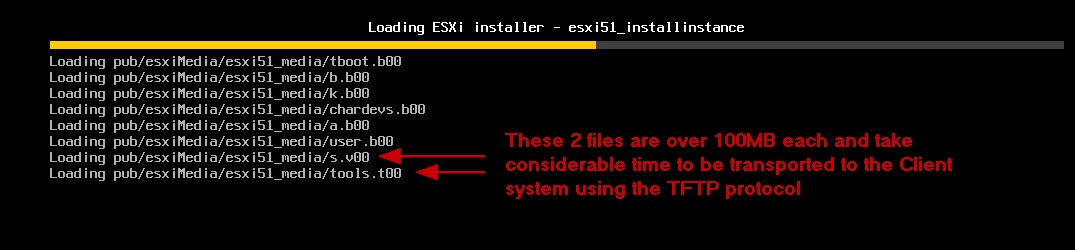
Unlike other operating systems (Windows and Linux) provisioned by Provisioner where we recommend initiating provisioning events 1 to 2 minutes apart, for ESXi 5.x we recommend a wait period of 3 minutes between the initiation of provisioning events. Should you experience failures due to slow networks or other causes, increase the lag time between provisioning events. ESXi 5.x in particular has 2 large files that are transported to the client system over the relatively slow TFTP protocol.
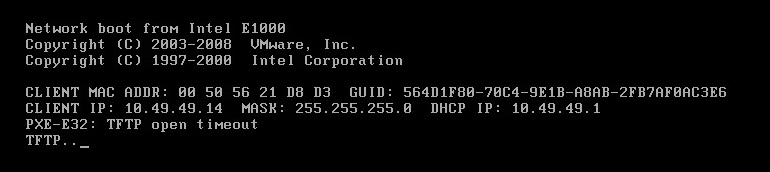
In the rare event of TFTP "saturation", your provisioning event will stall (typically at either the s.v00 or tools.t00 file and the progress bar will be frozen), then the following message will be displayed on the client screen:
Should this happen, we recommend restarting the services and then re-trying to provision the client while no other provisioning events are taking place.
Incorrect Boot Sequence
When provisioning ESXi 5.x (this includes ESXi 5.0, 5.0 Update 1, 5.1 and greater), if you incorrectly set the BIOS to "network boot first, then boot to disk" your client will hang twice for several (up to 10) minutes after each of the last 2 reboots before successfully completing the provisioning process. During these "hangs", the client screen will display something similar to:
The provisioning event will eventually end successfully in spite of these delays which are caused by the ESXi 5.x client software issuing malformed requests to the Provisioner server.
This issue is greatly reduced and the hangs are eliminated when the BIOS boot sequence is "boot to disk boot first, then to network" with an empty drive.
Workaround for Adding the Gateway to ESXi 5.x Post Install Process
In releases 6.5.0 and 6.5.1, the default Gateway does not get set for ESXi 5.x provisioned systems. A patch addresses this.
After installing the patch, load the media, prepare an install instance and create a template as described in this tutorial, then provision a system.
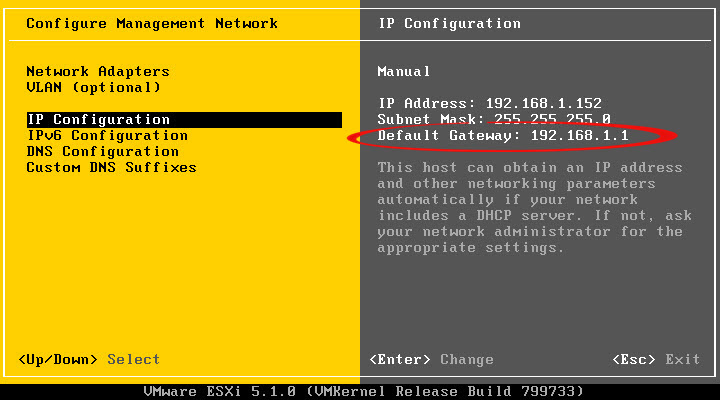
Once the system has been provisioned and migrated to the production vLAN, the default gateway should be as shown below:
Note: if you require a gateway and do not see the gateway on a provisioned ESXi 5.x client system as in the screenshot above, generate a .help file and provide it with steps to reproduce to TAC@Cisco.com.
If you had created ESXi 5.x Install Instances prior to installing the patch, at patch installation time, you will see a notification similar to the one below: