User's Guide feedback on: Cisco Server Provisioner 6.6 User's Guide ("Chuck Berry") - Customizing the Provisioning ProcessProvision_Ubuntu_Debian_CustomizeTutorial: Provision Ubuntu and Debian > Customizing the Provisioning Process /Dear User's Guide Staff,
Customizing the Provisioning Process
After provisioning templates and roles have been created, the provisioning process can be tuned and enhanced to include the installation of applications, the execution of scripts and the copying of files onto the system being provisioned.
Customizing the provisioning process is done by editing the control (configuration) file preseed.cfg. Please note that the Provisioner PXE Server includes 2 types of preseed files for each Ubuntu distribution/architecture: desktop and server.
•MAC-Specific Provisioning:
There are 2 ways to customize the provisioning process:
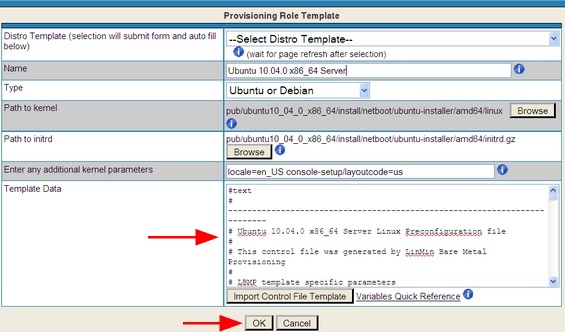
1)For a given Provisioning Role Template, edit the Template data in the GUI:
2)To customize the master Template that builds all GUI templates, edit the file directly:
After you have edited this file, all GUI templates you create will be populated with the file that you edited. Be sure to make a backup copy of the .tmpl file before you edit it.
Caution: If you alter any line containing either ";;" or "$", you may corrupt the template. Below are sample lines that should not be modified:
Caution: back up any modifications you make to these control files because when you upgrade your Provisioner PXE Server or when you run setup.pl to change the default host name, password and other parameters, your changes will be overwritten!
Here is a very good reference on preseeding. Cisco does not support changes made to the files we provide, but we use this link on occasion ourselves! http://www.debian-administration.org/articles/394
•An overview of forcing a particular Ethernet device (NIC) to be used: http://www.tldp.org/HOWTO/BootPrompt-HOWTO-11.html#ss11.1 For example, if you have dual NICs on your system, you may use the kernel parameter netdev=eth0 or ether=0,0,eth0 to force the use of eth0. Optionally, you may try to turn off the "auto-probe" function by using the kernel parameter ether=0,-1,eth0
Older versions of Ubuntu and Debian:
If you create a Provisioning Role for a Ubuntu or Debian option, ensure that you add the additional kernel parameters specified in the information panel associated with the Enter additional kernel parameters field.
Ubuntu / Debian Distribution
Required Values for the Enter additional kernel parameters Text Entry Box
Ubuntu 8.04.1
locale=en_US console-setup/layoutcode=us (see Notes 2 and 3)
Debian (for etch only)
locale=en_US console-setup/layoutcode=us (see Notes 2 and 3)
The Separate the languagechooser and ramdisk_size entries by one space
Separate the locale and console-setup entries by one space.
The console-setup/layoutcode setting specifies the keyboard layout. To use a non-US keyboard layout, substitute the country-keycode for us.
For:
Browse to the directory (substitute amd64 for i386 if desired):
Path to kernel:
pub/ubuntu8_04_1_i386/install/netboot/ubuntu-installer/i386/linux
Path to initrd:
pub/ubuntu8_04_1_i386/install/netboot/ubuntu-installer/i386/initrd.gz
Use the pub/ubuntu8_04_1_x86_64/ directory and “amd64” instead of “i386 for 64-bit deployments.
Starting with Ubuntu 9.04, passwords must have at least 8 characters.
If wish to provision a version of Linux that is not supported by Cisco and you have used "loadlinux.pl" to place an unsupported ISO into a supported OS directory, please note the paths and file names for the kernel (“linux”) and ramdisk (initrd.gz), as well as the control file (*.cfg) in the image above (and use the "Browse" buttons to navigate to the appropriate files.)


 The Separate the languagechooser and ramdisk_size entries by one space
  Separate the locale and console-setup entries by one space.
 The console-setup/layoutcode setting specifies the keyboard layout. To use a non-US keyboard layout, substitute the country-keycode for