Backup Image Locations: Imaging Profiles are used to backup (create a snapshot of all disc/partitions contents) or restore a client at that client's next network boot. The backup or restore is performed to or from subdirectories of /home/tftpboot/images/ that you specify when creating or editing a given system’s Imaging Profile.
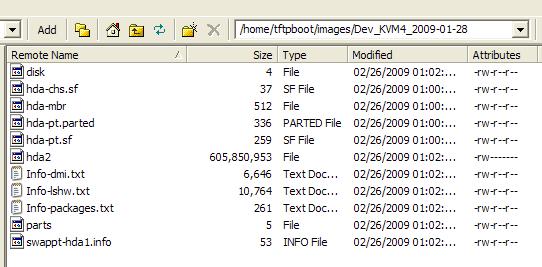
When selecting the name of the Snapshot (backup) file, we suggest you include the date in it, such that you can have different rollback dates. Otherwise, you will be backing up to the same file each time, and will only have the last backup to rely on. A directory with the name you selected will be created and populated:
Disk Imaging directory on the Provisioner PXE Server for each client system
Disk Space: please ensure that you have enough disk space on the Provisioner PXE Server to store the disk images you capture from client systems. You may also create a symbolic link to another location to replace the designated default (if you have not already created backup directories there):
cd /home/tftpboot
rm /home/tftpboot/images
link -s {/new_path_you_designate/} images
Note: the Provisioner PXE Server uses a component provided by the open source project Clonezilla, which is distributed under the terms of the Gnu Public License (GPL). LinMin Corp. contributes to the Clonezilla project. Thank you Clonezilla!