User's Guide feedback on: Cisco Server Provisioner 6.6 User's Guide ("Chuck Berry") - Tutorial: Imaging: Backup, Restore and CloneImagingTutorial: Imaging: Backup, Restore and Clone /Dear User's Guide Staff,
Tutorial: Imaging: Backup, Restore and Clone
This tutorial will guide you through the process of imaging (backup, restore, clone) systems running Intel Architecture (x86, x86-64, amd64).
Imaging allows you to back up (capture a disk image), recover (restore disk image to the same system) and clone (restore disk image to another system with identical hardware). Combining Imaging and Provisioning gives IT organizations an excellent way of addressing any system deployment and recovery scenario.
The Provisioner PXE Server uses Clonezilla as its imaging engine. Clonezilla is an open source project partially funded by LinMin Corp. Clonezilla was selected because it is the best open source bare metal imaging solution available, used on millions of systems. Working closely with the Clonezilla team, we integrated it into the Cisco Server Provisioner framework to create a scalable, database-driven imaging solution complete with an application programming interface for easy integration into customers' own applications.
The Provisioner PXE Server imaging subsystem will recognize all major Linux and Windows file systems and will not back up empty disk sectors. The typical compression ration is 3:1. Backup and restore speeds are extremely high and further improve with the speed of processors, disks and networks.
For unrecognized file systems, the entire disk will be copied (using dd), increasing the time and disk space required to perform imaging functions while still providing excellent integrity.
Cisco Server Provisioner Imaging is intended for Disaster Recovery (DR) and Cloning:
•Disaster Recovery: in this mode, the disk image that is restored to a system was captured from that same system, providing a way of rolling back to known-good state of when the most recent backup was taken. Operating system, applications, settings and data are restored exactly as they were captured, eliminating the need to re-install applications. Because our imaging backup takes place when a system boots to the network, it is not suitable for 24x7x365 environments and is best used in conjunction with traditional file-by-file backup solutions.
•Cloning: in this mode, you deploy the disk image collected from a system to another system with identical hardware. Many customers use their Provisioner PXE Server to deploy systems in their data centers as an alternative to provisioning: this is a very viable solution if the hardware is homogeneous or has only limited variants (e.g., hundreds or thousands of systems of 3 to 5 different types.) Some customers capture "Golden Images" that contain scripts that easily allow the cloned system to self-customize (change IP, host name, etc.) when it first boots, eliminating the need for manual intervention.
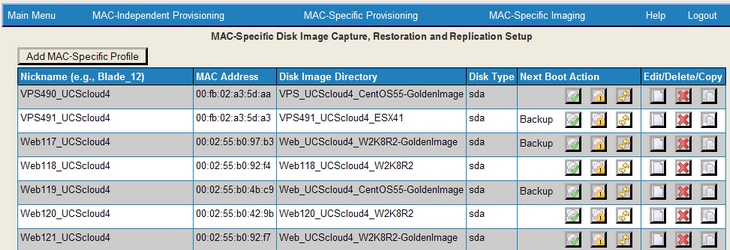
Here is a representative Imaging Dashboard:
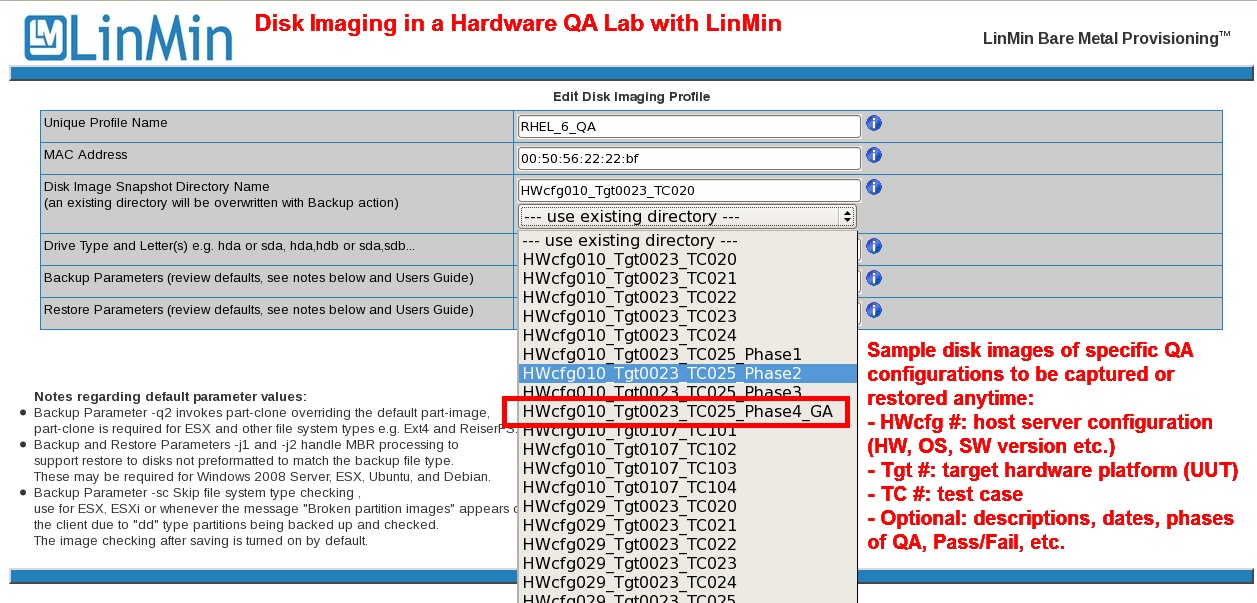
Below is an example of a customer using Imaging to capture and restore systems used in the Quality Assurance of hardware devices they manufacture:
Important: Client NIC and RAID/SAS driver support requirements
In order for imaging or the provisioning of Windows Server 2008/Windows 7 to work properly, the Client's NIC and RAID/SAS drivers must be incorporated into the version of Ubuntu used by Clonezilla.If either driver is missing from Ubuntu, you cannot image or provision Windows Server 2008/Windows 7 on the Client. If you experience such a failure, follow the diagnostic steps to identify the required/missing drivers.
RAID support varies based on NIC and RAID/SAS controller vendor and model. If your client system's RAID controller is not recognized by the Provisioner PXE Server, it may be possible to support it by rebuilding the Imaging Subsystem with the appropriate open source driver, provided market demand exists for this RAID controller. If no open source driver is available, then the RAID device cannot be supported. Similarly, NIC driver support may vary: as new Network Interface Cards appear on the market, it may take time to have their drivers incorporated. After identifying the required/missing drivers, contact Support for more information.