MAC-Specific Provisioning, also known as "MAC-Spec", "Push Provisioning" or "Fire and Forget Provisioning" is an predetermined provisioning mode in which the system administrator pre-assigns to each system (based on its MAC address) the Provisioning Role Template (containing the operating system, applications and configurations) to install on client system after it a network boot ("netboot" or "PXE boot").
Using MAC-Spec provisioning involves a 2-step process:
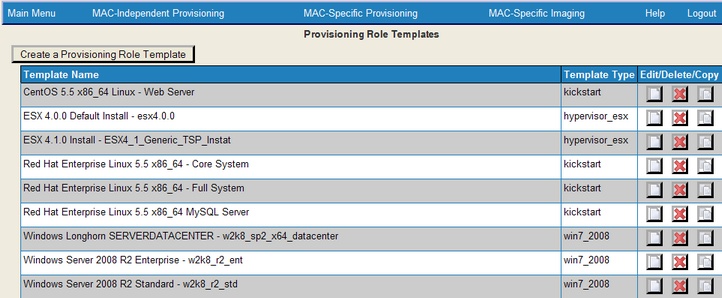
1)Select from your list of Provisioning Role Templates. Here is a sample list of Templates:
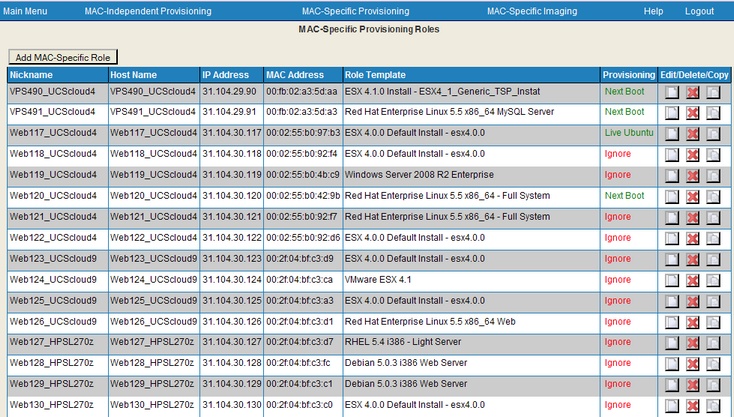
2)Create a System Role and assign it a Role Template. Here is an example of the Roles Dashboard with many System Roles:
Role templates can be modified to install applications, run scripts and copy files during provisioning.
Important: you can prevent accidental re-provisioning of a specific system by using the “Ignore” radio buttons:
1.“Ignore” will process the request from the specific MAC address and redirect the system to boot from its local hard disk. Use this option for mission critical system where you may wish to manually recover data or system state and prevent an accidental re-provisioning of the system.
2.“Always” will force the system to be provisioned each time it makes a network boot.
3.“Next Boot Only” will provision the system on the next boot only, then set the state to “Ignore”. This works with systems that you manually trigger to boot from the network, but also allows you to set the system’s BIOS to boot from the Network first, then to HD: if the option is set for a given MAC address, it will get provisioned, and upon reboot, will be ignored until you manually reset the radio button to “Next Boot”.
Note: Imaging Roles (in the following section) take priority over MAC-Specific Provisioning Roles Business Rules.
Best Practices:
Do not recycle MAC Provisioning Role Templates. Use the “Copy” function to copy known-good templates then modify the recently created Role Templates. “Edit” should be used for permanent changes to existing templates and development changes to new templates.
It is best when making changes to Role Templates to keep previous known good templates until the new ones are proven. These can be valuable to determine what changed and what may be causing any new issues in a new template. You can append or prepend information such as "obsolete-yyymmdd" to the names to avoid selection confusion. They can be deleted when the copied and modified clones are known to be good.