Release Notes: Provisioner Bill Haley Supplemental Package
April 2016
User's Guide feedback on: Cisco Server Provisioner 6.6 User's Guide ("Chuck Berry") - Release Notes: Provisioner Bill Haley Supplemental Package April 2016Release_Notes_Bill_Haley_SupplementRelease Notes > Release Notes: Provisioner Bill Haley Supplement /Dear User's Guide Staff,
Release Notes: Provisioner Bill Haley Supplemental Package
April 2016
What's new in the Bill Haley Supplemental Package?
•Clonezilla was updated to 20160210-wily-amd64, providing broader hardware support and other enhancements made in 2016.
•WinPE (to initiate the provisioning of Windows Server 2008/2012 and Windows 7/8) was updated to include more hardware device drivers.
•Clonezilla hardware discovery and capture script profileClientSystem.sh was enhanced.
The Bill Haley Supplemental Package or "Plus" Package ("Bill Haley") requires that your system be running Provisioner 6.6 ("Chuck Berry")
Before installing Bill Haley, if running in a virtual machine, suspend the VM and take a snapshot then resume your VM.
To install Bill Haley, download the file and place it in /usr/local/linmin then, using the command line, go to that directory and:
# sh linmin-bmp-plus-BillHaley-b1306291844-p1604041318.exp
You will be prompted to stop the Provisioner services: after ensuring that no PXE, GUI user or API operations are in progress, enter stop when prompted:
Respond: ^^^^^ read above, reply 'stop' to stop BMP service, 'q' to quit :stop:q: [q] :stop
As Bill Haley is completing its installation, you will be prompted to to acknowledge that you must restart the Provisioner services manually from the command line:
# sh linmin-services.sh restart
... if above command fails:
...... reboot this machine and check service status with commands:
...... # cd /usr/local/linmin
...... # sh linmin-services.sh status
Respond: ^^^^^ read above, and reply 'a' to acknowledge and exit:a: [] :a
Finally, after the Bill Haley installation script has successfully finished, restart the Provisioner services manually from the command line:
#
# sh linmin-services.sh restart
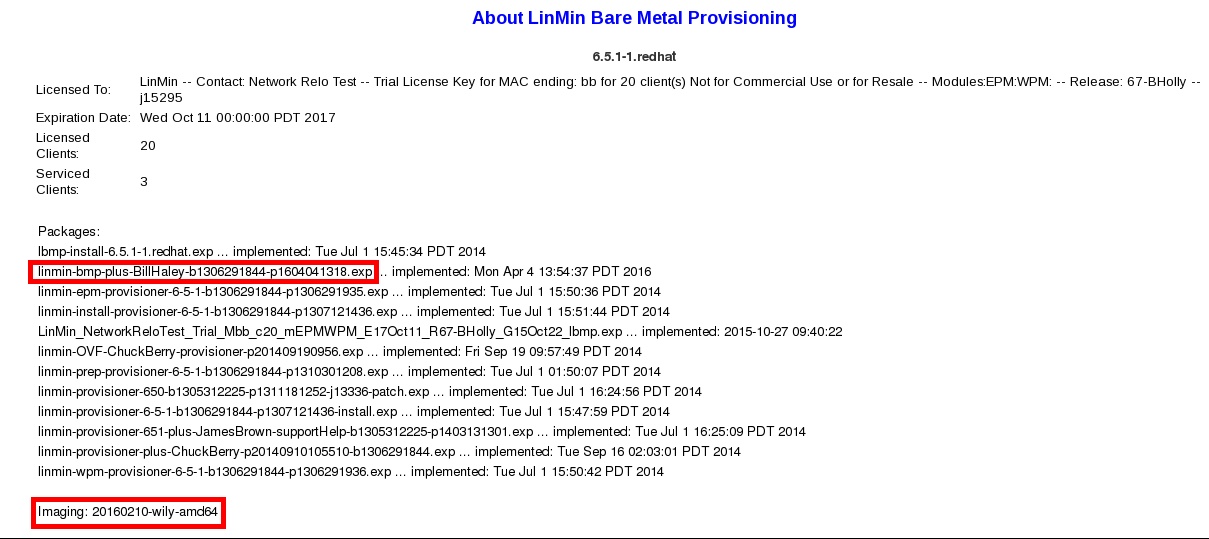
After successfully installing Bill Haley, the Help page will show the Bill Haley package installed and the updated version of Clonezilla:
Should the Provisioner services not restart, reboot the system then:
# cd /usr/local/linmin
# sh linmin-services.sh status
To uninstall Bill Haley (to restore the files that were automatically backed up prior to Bill Haley installation):
# sh linmin-bmp-plus-BillHaley-b1306291844-p1604041318.exp --restoreBackup
You will be asked to stop the Provisioner services, restore the original files then restart the Provisioner services manually from the command line.
To list all options, invoke help:
# sh linmin-bmp-plus-BillHaley-b1306291844-p1604041318.exp --help
Conventions:
Note: starting in 2014, releases, supplemental (plus) packages and patches use names of artists inducted into the Rock and Roll Hall of Fame